@amuseapp/caa-generator
A generator of AAC pictograms and easy-to-read text for cultural heritage. It was born for amuseapp’s accessible itineraries and runs with a single Google API key.
 |
 |
 |
 |
 |
 |
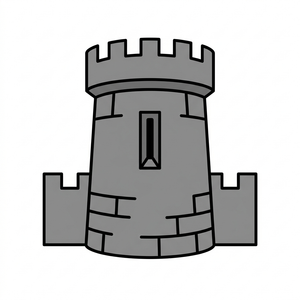
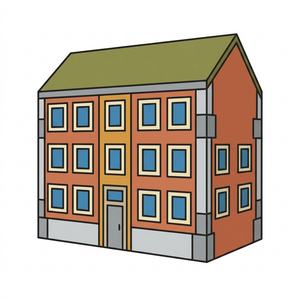
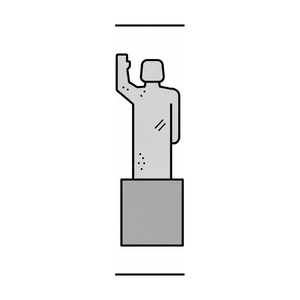
| castello (castle) | torre (tower) | edificio (building) | piazza (square) | statua (statue) | amare (to love) |
Six pictograms from the amuseapp set (300 px), under CC BY 4.0: see Licence.
What it is
Two tools that work together on content for people with reading difficulties:
- A pictogram generator. Given a concept (for example “moat”) and the sentence it appears in, it describes the drawing, generates it in one single style, runs it through an automatic quality gate and stores it in a local library together with all the data of the check.
- An easy-to-read text kit. The simplification prompt for museum texts, the itinerary glossary, a mechanical check of the writing rules (L1-L12, plus the subordinate-clause counter L13) and the symbol policy (which words never get a pictogram).
It is not an app: it is a TypeScript library with a command line (caa-gen). Persistence, the text model, the image model and the vision model are interfaces: you can replace them with your own. The prompts and the word lists are in Italian: version 1 generates from Italian only.
What is not included: the end-to-end symbolizer (choosing pictograms for the keywords of a whole itinerary) and publishing to a web app or a database. The kit exposes the pieces (simplifyPoiText, lintSymbols, shouldSymbolize, ensurePictogram) but no command that orchestrates them. See also the known limits.
Why
- The licences of existing sets. ARASAAC, the most widely used free set, is CC BY-NC-SA and its terms exclude commercial products without written permission. Widgit is proprietary. Anyone building a product for museums, public bodies or companies cannot use them as a base.
- Museum vocabulary is missing. Moat, drawbridge, battlements, fresco, coat of arms, loggia: general-purpose sets do not have them, or have drawings that do not convey the concept. Cultural venues need pictograms for their own vocabulary.
- Style consistency. An accessible route works when the same thing always has the same drawing and all drawings look like they come from the same hand. With one style and one gate, every new pictogram enters the library under the same conditions as the previous ones.
How it works
lemma + context sentence
        |
        v
  concept description  (TextModel)
  class, drawing description, aliases, accepted words, distractors, related words
        |
        v
  image in the single "A3" style  (ImageModel)
        |
        v
  automatic gate  (VisionModel)
  frame cropping, constraints, recognition at 72 px
        |
   pass? ---- no ----> one regeneration with a tightened description ---- no ----> draft, never used
        |
       yes
        v
  300 and 72 px PNGs + manifest in the store (FileStore, MemoryStore or your own)
The concept description
The text model receives the lemma and the sentence it appears in (the symbol stands for the concept the word has in that sentence, not for the isolated word) and returns, validated with zod:
- the class of the concept (object, place, part, material, person or role, action, abstract), which decides the composition rule: a part of a whole (the moat) is drawn large with the rest toned down, an action with a figure in profile and motion lines, a material with the typical object made of it;
- a one-sentence description of what to draw;
- aliases in Italian and English;
- the accepted words, that is, the names someone looking at the drawing can correctly give it. Generic hyperonyms (building, person, place, thing) are forbidden, so a pictogram for “cathedral” does not end up serving “building” in every context;
- four distractors: words from the same field but a clearly different concept, opposites included, to expose an ambiguous drawing;
- related words (
related): the ones plausible for a correct drawing (parts, close hyperonyms, associated actions).
The single style
The style a3-2026-10 is a fixed text passed to every generation: flat pictogram with a uniform medium-weight black outline, geometric shapes, flat fills, an earthy palette (terracotta, ochre, olive green, light blue, cream, greys) with the rule that the real colour of the material wins when it identifies the concept (gold of coins, white of marble), signage style for adults, one isolated subject, no human figure unless the concept is a person, a role or an action. The fixed constraints are: square, pure white background, subject at 80 per cent of the area, no text, no shadow, no frame, readable at 72 px. The text is in src/pictogram/style.ts. If you change it, change its identifier too: the library records which style every row was generated with.
The automatic gate, with no human approval
This is the most important design choice: nobody approves pictograms before use, so the gate is the only arbiter and it must be strict. A row becomes approvato (approved) only if:
- Frame cropping. The image model sometimes draws a frame despite the ban (in internal amuseapp tests about 4 images in 10 with the Flash model; figure not published). A ring-based detector finds it, crops it without touching the subject and brings the image back to a white square with a uniform margin. If a frame remains, even a thin or light grey one, the image is rejected.
- Constraints. Square image, white background at the edge, no text, letters or numbers (checked by the vision model).
- Recognition at 72 px, in two steps:
- free word (transparency): the vision model sees the drawing reduced to 72 px and is asked for a single word; it must equal (after normalisation, never by containment, never by hyperonym) one of the accepted words;
- multiple choice (translucency): only if the free word falls in the concept’s field (it is among the related words) and does not coincide with a distractor, the model is asked to choose between the lemma, the four distractors and “none of these”. It passes only if it picks the lemma. If the free answer matches a distractor (for example “to exit” for “to enter”) the drawing is rejected at once: it may show the opposite concept.
If the gate fails, the pictogram is regenerated once with a tightened description (“the drawing was read as X instead of Y”). If it fails again the row stays bozza (draft) and no consumer uses it: better no symbol than a wrong one. Do not widen the accepted words to pass more images: that is exactly the mistake the gate exists to prevent.
The spend cap (SpendMeter) counts every generation and can have a deadline: in the CLI the default is 8 images per command (CAA_MAX_GENERATIONS). Generations go through a single-slot queue, because with parallel requests the Google key gets 429 errors.
The optional ARASAAC convention
With --arasaac-hint the generator asks ARASAAC how it represents the concept (which elements, which pose, which signs such as arrows or motion lines) and passes only the sentence to the text model. ARASAAC is used as a source of conventions, not of drawings: the downloaded PNG is only used to have a sentence written about it, and is never saved or given to the image generator.
The literature criteria it follows
The rules come from two main sources: Inclusion Europe’s European rules for easy-to-read information (“Information for all”, Italian edition 2012, with Anffas) and the Widgit guide to good symbol content (“Guide to Good Symbol Content”, 2021). ARASAAC (Government of Aragon) is a source of compositional conventions, not of drawings.
Symbols (S1-S10)
| Criterion | Where it lives in the code |
|---|---|
| S1 the symbol stands for the concept the word has in that sentence | describeConcept always receives the sentence as context |
| S2 symbols as transparent as possible | gate: free word at 72 px (transparency), then multiple choice (translucency) only within the concept’s field; opaque is rejected |
| S3 same concept, same symbol; pairs for opposites | one library row per lemma, with aliases; distractors include the opposite; lintSymbols flags one lemma with several symbols and one symbol for non-synonym lemmas |
| S4 few symbols per sentence, only key words | at most 3 per sentence; generic words, numbers, qualifiers and negative sentences excluded (shouldSymbolize) |
| S5 “cover the text” test | per symbol, it is the recognition at 72 px; per sentence a human review is still needed |
| S6 sequence follows the sentence | withOffsets orders symbols like the words |
| S7 close concept with the right word underneath, without changing the meaning | aliases only within the same family, generic hyperonyms forbidden |
| S8 no plural or tense qualifiers | one subject only, no added elements |
| S9 adult-appropriate, clear, one thing to look at | signage style for adults, isolated subject, no scene, frames cropped, no text |
| S10 proper names without a symbol | collectProperNames and lintSymbols (C5) |
The symbol policy (src/text/policy/symbols.ts) also drives the C1-C10 checks of lintSymbols: same lemma with several symbols, same symbol for different lemmas, proper names, abstract qualifiers, negative sentences with symbols, repetitions.
Easy-to-read text (L1-L13)
caa-gen lint-text and lintEasyText mechanically check an Italian text. Errors (fail) would trigger a new generation attempt, warnings (warn) are only reported.
| Rule | What it checks |
|---|---|
| L1 | sentence length: warning above 12 words, error above 15, error from 13 if there is a subordinate clause |
| L2 | numbers: no Roman numerals (“Ercole II”), no thousands with a dot, no large numbers (years stay), no percentages |
| L3 | passive and impersonal forms (“è stato costruito”, “si vede”) |
| L4 | negations at the start of a sentence and two sentences in a row with “non” |
| L5 | subjunctive, conditional, remote past (errors), gerund at the start of a sentence (warning) |
| L6 | unexplained difficult words; glossary terms on first appearance without “cioè” |
| L7 | metaphors and idioms (list) |
| L8 | synonyms for the same concept (castello and fortezza, percorso and itinerario) |
| L9 | pronouns at the start of a sentence with more than one possible antecedent |
| L10 | no sentence addressing the reader; plural voice (“noi”, “vi”) forbidden |
| L11 | fidelity to the original: proper names, years and comparisons must not be lost |
| L12 | structure: the first sentence names the place, the first stop invites to begin, the last one closes the route |
| L13 | countSubordinates: the subordinate-clause counter used by L1 |
The simplification prompt (buildSimplifyPrompt) embeds the same rules: one idea per sentence, at most 12 words, present or present perfect, never passive, common words with “cioè” for difficult terms, the same word for the same concept, no metaphors, positive information before negations, years in digits and no Roman numerals, only what the source text says.
Known limits
- No validation with readers. The literature sources (Inclusion Europe, UNE 153101, the German and Nordic guidelines) require people with intellectual disability to check the content. This project does not do that and cannot replace it: the automatic checks estimate recognisability for a model, not comprehension by a person. Do not use names or logos of standards (for example the European “easy to read” logo) on the content you produce.
- Abstract and relational concepts are weak. Concrete nouns and objects work; verbs, historical roles, parts of a whole and abstract concepts (style, epoch, power) pass much more rarely, and for abstract ones the gate prefers to produce nothing. Iconicity studies on existing sets say the same thing: these are the least transparent concepts for everyone.
- A model as judge. Recognition is done by a model from the same family that draws: correlated errors are possible (a drawing wrong in a way the judge does not see). That is why the gate is strict and fails closed, but it is not a test with people.
- Data and prompts in Italian. The prompts, accepted words and distractors are in Italian and lemmas must be in the Latin alphabet without letters such as “ł”. The data fields are Italian too (
classe,stato,approvato,bozza,riconoscimento,vincoli_ok): they come from amuseapp’s backoffice and may be renamed before version 1.0. Other languages work only as aliases for lookup. - The end-to-end symbolizer and publishing are not included (see above): the project generates and checks single pictograms and checks texts, it does not produce complete itineraries.
- Cost and quota depend on your Google key. Each pictogram needs at least one text call, one image call and one or two recognition calls, plus a regeneration if the gate fails. We have not verified prices: work out the cost from the current Google price list. The
CAA_MAX_GENERATIONScap limits images per command, not spending. - A generated pictogram is a starting point: an AAC specialist should review the set before it is used with vulnerable audiences.
Run it with your Google key
You need Node 20.12 or later (running the tests needs Node 22.12 or later) and a key from Google AI Studio. A single key covers text, images and recognition.
git clone https://github.com/amuseapp-labs/caa-generator
cd caa-generator
npm install
cp .env.example .env        # put your key in GOOGLE_API_KEY
npm run build
npx caa-gen --help
Generate a pictogram:
npm run caa-gen -- pictogram fossato --context "Il fossato circonda il castello." --out ./library
With the optional ARASAAC compositional convention:
npm run caa-gen -- pictogram entrare --context "Entra dal portone." --arasaac-hint
The command writes the manifest library.json and the files {id}_300.png and {id}_72.png into ./library, then prints the outcome: Approvato (exit 0), Bozza, non approvata dal cancello (exit 2) or an error (exit 1). A lemma that is already approved costs nothing: it is found in the library, also by alias.
Look at the library:
npm run caa-gen -- library list --out ./library
npm run caa-gen -- library sheet --out ./library        # contact sheet, needs ImageMagick; skipped if missing
Check an easy Italian text (one sentence per line, or separated by punctuation). The file examples/testo-facile-ferrara.txt holds six easy sentences about a castle with one deliberate error: the last one uses the remote past (“fu costruito”), forbidden by rule L5. The command finds it and exits with 1:
npm run caa-gen -- lint-text examples/testo-facile-ferrara.txt --place-name "Il Castello Estense"
# ERRORE  L5  frase 6: Passato remoto "fu": usa il presente o il passato prossimo.
# 6 frasi, 1 errori, 0 avvisi
With “è stato costruito” instead of “fu costruito” the error disappears and a warning about the passive voice (L3) remains.
npm run build compiles into dist/: npx caa-gen (from the project folder) runs the compiled version, which is also the bin command npm installs. As a library:
import { ensurePictogram, FileStore, GeminiTextModel, GeminiImageModel, GeminiVisionModel, SpendMeter } from '@amuseapp/caa-generator'

const result = await ensurePictogram({
  lemma: 'fossato',
  context: 'Il fossato circonda il castello.',
  languageCode: 'it',
  meter: new SpendMeter(8),
  store: new FileStore('./library'),
  text: new GeminiTextModel(),     // gemini-2.5-flash
  image: new GeminiImageModel(),   // gemini-2.5-flash-image
  vision: new GeminiVisionModel(), // gemini-2.5-flash
})
// result.status: 'approved' | 'draft' | 'exhausted' | 'error' | 'skipped'
Environment variables: GOOGLE_API_KEY (or GOOGLE_GENAI_API_KEY), and optionally CAA_TEXT_MODEL, CAA_IMAGE_MODEL, CAA_MAX_GENERATIONS. No key is written in the code: .env is ignored by git.
To move it to a database or a bucket, implement PictogramStore (lookup, create, update, list, putImages); to use another provider, implement TextModel, ImageModel or VisionModel.
Contributing
- Open an issue before a large change. Small fixes (word lists, lint rules, bugs) are welcome directly as pull requests.
npm testandnpm run buildmust stay green. Tests use simulated models: no keys needed.- The gate is the part that protects readers: a change that lets more images through must come with a test showing why they are right, and must not widen the accepted words.
- Changing the style means a new identifier (
STYLE_V1.id) and a note in the pull request: rows already in a library stay tied to their style. - Welcome contributions: vocabulary (distractors, forbidden hyperonyms, metaphors), new lint rules with their source, stores for other databases, support for other languages, and above all validation experiences with readers.
Licence
- Code: MIT, Copyright 2026 amuseapp (
LICENSEfile). - Six example pictograms in
docs/esempi/: by amuseapp, CC BY 4.0. Attribution line: “Pittogrammi: amuseapp (amuseapp.art), CC BY 4.0”. Details indocs/esempi/LICENSE.md. - ARASAAC is cited only as a source of compositional conventions. No ARASAAC drawing is included in the repository or used to train models; with
--arasaac-hintthe generator receives only a sentence of text. - The full set of amuseapp pictograms will be published separately, in a dedicated repository, also under CC BY 4.0.
- Images you generate with this software remain subject to the terms of use of the Google service that produces them.